Top 10 Data Analyst Skills You Need to Succeed
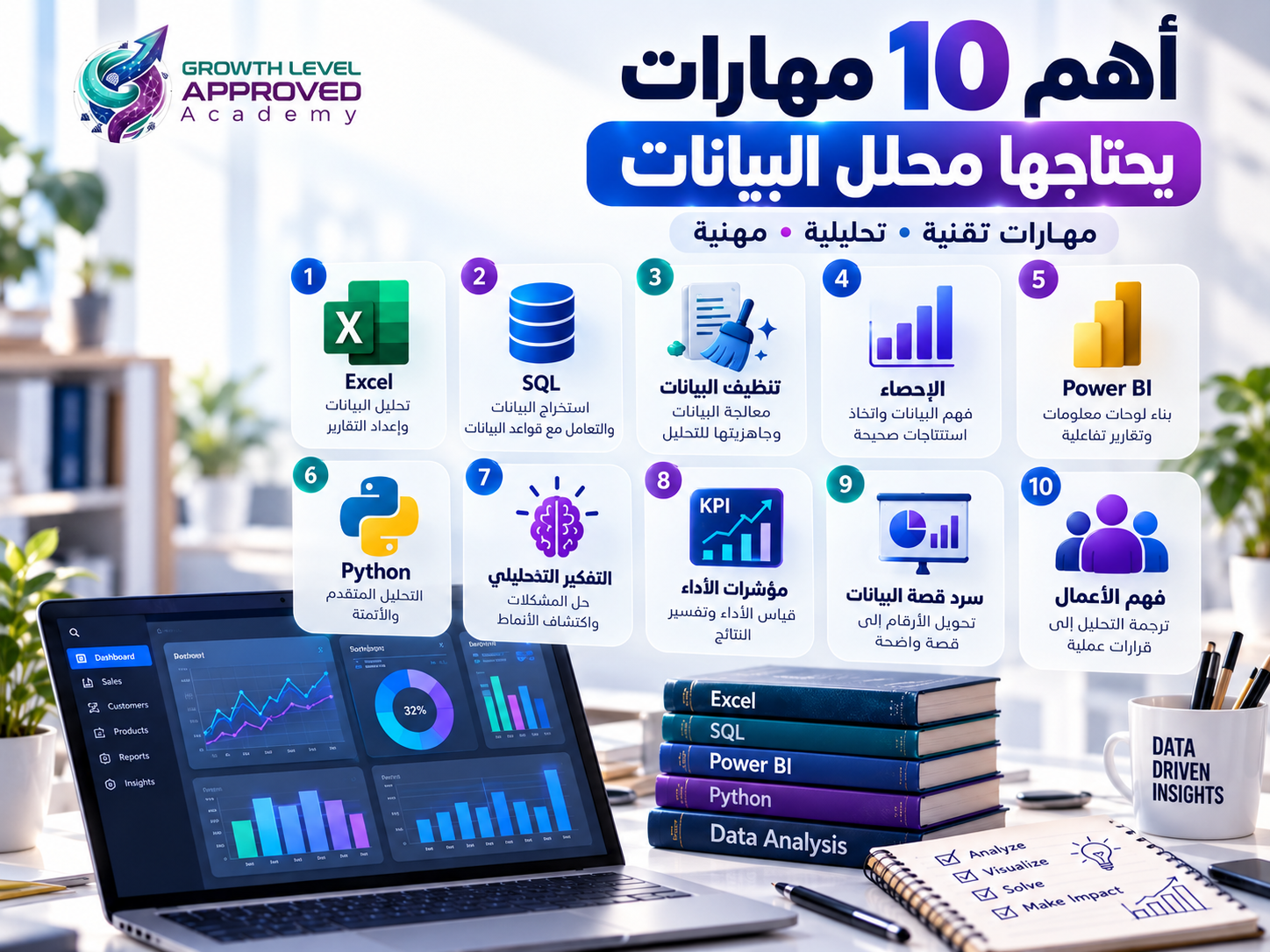
Top 10 Data Analyst Skills You Need to Succeed
Imagine applying for a data analyst position and listing Excel, SQL, Power BI, and Python on your resume.
During the interview, the hiring manager gives you a sales dataset and asks: "Why did revenue increase while gross profit margin declined?"
Knowing how to use analytical tools is helpful, but answering this question requires more than software knowledge.
A successful data analyst combines technical expertise, analytical thinking, business understanding, and communication skills.
In this guide, we'll explore 10 essential data analyst skills, explain why each one matters, and show how to demonstrate them through practical projects.
What Skills Does a Data Analyst Need?
Data analyst skills can be grouped into three categories.
Technical skills: Spreadsheets, SQL, data preparation, statistics, programming, and visualization.
Analytical skills: Problem-solving, critical thinking, evaluating assumptions, and interpreting results.
Professional skills: Communication, business understanding, collaboration, and stakeholder management.
Requirements vary by industry, employer, and seniority level. Not every data analyst position requires the same tools or depth of expertise.
1. Microsoft Excel
Excel remains a practical tool for organizing, calculating, exploring, and reporting data.
Essential Excel Skills
Tables and data formatting.
SUMIFS and COUNTIFS.
IF and IFS.
XLOOKUP.
PivotTables and PivotCharts.
Power Query.
Date and text functions.
Practical Example
Suppose you receive a dataset containing 5,000 sales transactions.
Your manager wants to identify the three products generating the highest revenue during the first quarter.
You can clean the data, calculate revenue, and create a PivotTable grouped by product and reporting period.
How to Demonstrate This Skill
Build a sales workbook that includes documented cleaning steps, calculated KPIs, pivot tables, and a monthly summary.
The goal is to turn raw spreadsheets into reliable information that another person can verify.
2. SQL and Database Querying
SQL is commonly used to retrieve and analyze information stored in relational databases.
Business data may be distributed across customer, product, order, and payment tables.
An analyst needs to combine relevant records accurately.
Important SQL Concepts
SELECT and WHERE.
GROUP BY and HAVING.
INNER JOIN and LEFT JOIN.
CASE expressions.
Common Table Expressions.
Window functions.
SQL Example
Assume an orders table contains customer_id, quantity, and unit_price.
SELECT
    customer_id,
    SUM(quantity * unit_price) AS total_revenue
FROM orders
GROUP BY customer_id
ORDER BY total_revenue DESC;
This calculates revenue by customer, assuming prices and quantities are valid and no further adjustments are required.
How to Demonstrate This Skill
Create a sample relational database and write documented queries to analyze customers, orders, and products.
Explain your joins, aggregations, and validation checks.
3. Data Cleaning and Preparation
Raw data frequently contains inconsistencies that can distort analytical results.
Common problems include missing values, duplicate records, incorrect data types, inconsistent category labels, and unusual values.
Why Data Cleaning Matters
Imagine a duplicated transaction worth EGP 20,000.
If the record is included twice, reported revenue may be overstated.
However, automatically deleting similar rows can also cause errors because some apparently duplicated transactions may be legitimate.
Analysts need to investigate the meaning of each issue before choosing an appropriate correction.
Useful Tools
Excel, Power Query, SQL, and Python can all support data cleaning.
How to Demonstrate This Skill
Provide a before-and-after dataset with a data quality report describing detected problems, decisions made, and the impact of the cleaning process.
4. Applied Statistics
Statistics helps analysts summarize information, compare observations, and understand uncertainty.
Core Concepts
Mean, median, and mode.
Percentages and growth rates.
Variance and standard deviation.
Distributions and outliers.
Correlation and causation.
Sampling principles.
Confidence intervals and hypothesis testing when relevant.
Practical Example
Consider five daily revenue values:
1,000; 1,100; 1,200; 1,300; and 5,400 EGP.
The mean is 2,000 EGP, while the median is 1,200 EGP.
The unusually high final value raises the mean considerably.
Understanding both measures helps prevent misleading conclusions.
How to Demonstrate This Skill
Compare two groups or time periods and explain the statistical measures selected, the results, and their limitations.
5. Power BI and Data Visualization
Power BI enables analysts to prepare data, build models, create DAX measures, and develop interactive dashboards.
Key Skills
Power Query: Data import and transformation.
Data Modeling: Relationships between tables.
DAX: Calculations and measures.
Data Visualization: Appropriate chart selection.
Report Design: Clear communication of results.
DAX Example
Given a Sales table with a Revenue column:
Total Revenue = SUM(Sales[Revenue])This measure can be used in a Power BI report and responds to the applicable filter context.
How to Demonstrate This Skill
Build a dashboard showing revenue, gross profit, monthly trends, regional performance, and product comparisons.
Validate the numbers against the source data before publishing.
6. Python for Data Analysis
Python supports automation, reusable data processing, and advanced analysis.
It is useful in many analytical roles, though not mandatory for every position.
Important Libraries
pandas for tabular data.
NumPy for numerical computing.
Matplotlib and Seaborn for visualization.
scikit-learn for machine learning.
Python Example
import pandas as pd

df = pd.read_csv("sales.csv")

df["Revenue"] = df["Quantity"] * df["UnitPrice"]

revenue_by_product = (
    df.groupby("Product")["Revenue"]
    .sum()
    .sort_values(ascending=False)
)

print(revenue_by_product)
The code assumes a valid CSV file with the specified columns.
How to Demonstrate This Skill
Create a reusable script that imports new sales files, checks their quality, performs calculations, and exports a report.
Document how the script handles invalid or missing data.
7. Analytical Thinking and Problem-Solving
Technical skills are most valuable when applied to meaningful questions.
Suppose the manager reports a 20% decrease in revenue.
Rather than immediately building a chart, investigate:
Did order volume decline?
Did average order value change?
Were certain regions affected?
Did returns increase?
Did the business change its data definitions?
These questions help identify possible explanations and guide further analysis.
How to Develop This Skill
Practice transforming broad questions into measurable analytical problems.
For example, replace "Why is performance poor?" with "How did order volume and average order value change across regions over the previous three months?"
8. Business Understanding and KPI Knowledge
A data analyst needs to understand what the organization measures and why.
Common Business KPIs
Sales:
Revenue.
Gross Profit.
Gross Profit Margin.
Average Order Value.
Marketing:
Click-Through Rate.
Conversion Rate.
Cost Per Lead.
Customer Acquisition Cost.
Customer Service:
Average Response Time.
Resolution Rate.
Customer Satisfaction.
Practical Example
A company reports revenue of EGP 500,000 and cost of goods sold of EGP 350,000.
Gross profit is EGP 150,000.
Gross profit margin equals:
150,000 ÷ 500,000 × 100 = 30%.
This does not necessarily represent net profit because other expenses may still apply.
How to Demonstrate This Skill
Create a KPI dictionary defining each metric, its formula, its data source, and how it should be interpreted.
9. Data Storytelling and Communication
Analysts must explain results to people who may not have technical backgrounds.
Consider these two statements:
"Conversion rate declined from 4% to 2.5%."
"Conversion rate declined from 4% to 2.5%, a decrease of 1.5 percentage points. We should investigate traffic quality and the purchasing experience before identifying a cause."
The second statement provides context and suggests a reasonable next step without assuming causation.
How to Improve This Skill
After each project, prepare an executive summary covering the problem, findings, evidence, limitations, and recommendations.
Use visualizations only when they help the reader understand a specific point.
10. Business Collaboration and Stakeholder Communication
Data analysts often work with sales, finance, marketing, operations, and management teams.
Understanding how these teams define their metrics is essential.
Practical Example
Before calculating profit margins, an analyst should clarify:
How are discounts recorded?
Do revenue figures include taxes?
How are returns handled?
Which expenses are included in gross profit?
Do different departments use the same metric definitions?
Incorrect assumptions can produce misleading results even when formulas are mathematically correct.
How to Demonstrate This Skill
Document stakeholder requirements for a sample project, define the metrics, and explain how business decisions influenced your analytical approach.
Data Analyst Technical Skills vs. Soft Skills
Skill | Category | Portfolio Evidence |
|---|---|---|
Excel | Technical | PivotTable-based sales report |
SQL | Technical | Database queries |
Data Cleaning | Technical | Data quality report |
Statistics | Analytical | Statistical comparison |
Power BI | Technical | Interactive dashboard |
Python | Technical | Automated reporting script |
Analytical Thinking | Analytical | Problem investigation |
Business KPIs | Business | KPI dictionary |
Data Storytelling | Communication | Executive summary |
Stakeholder Collaboration | Professional | Requirements document |
These skills represent a practical learning framework, not a universal ranking of employer demand.
Junior Data Analyst vs. Senior Data Analyst Skills
Junior analysts often work on defined questions, basic queries, reporting, and data validation.
Senior analysts typically handle less clearly defined problems, more complex analytical models, stakeholder discussions, and quality assurance.
The differences depend on the organization and are not limited to the number of tools a person knows.
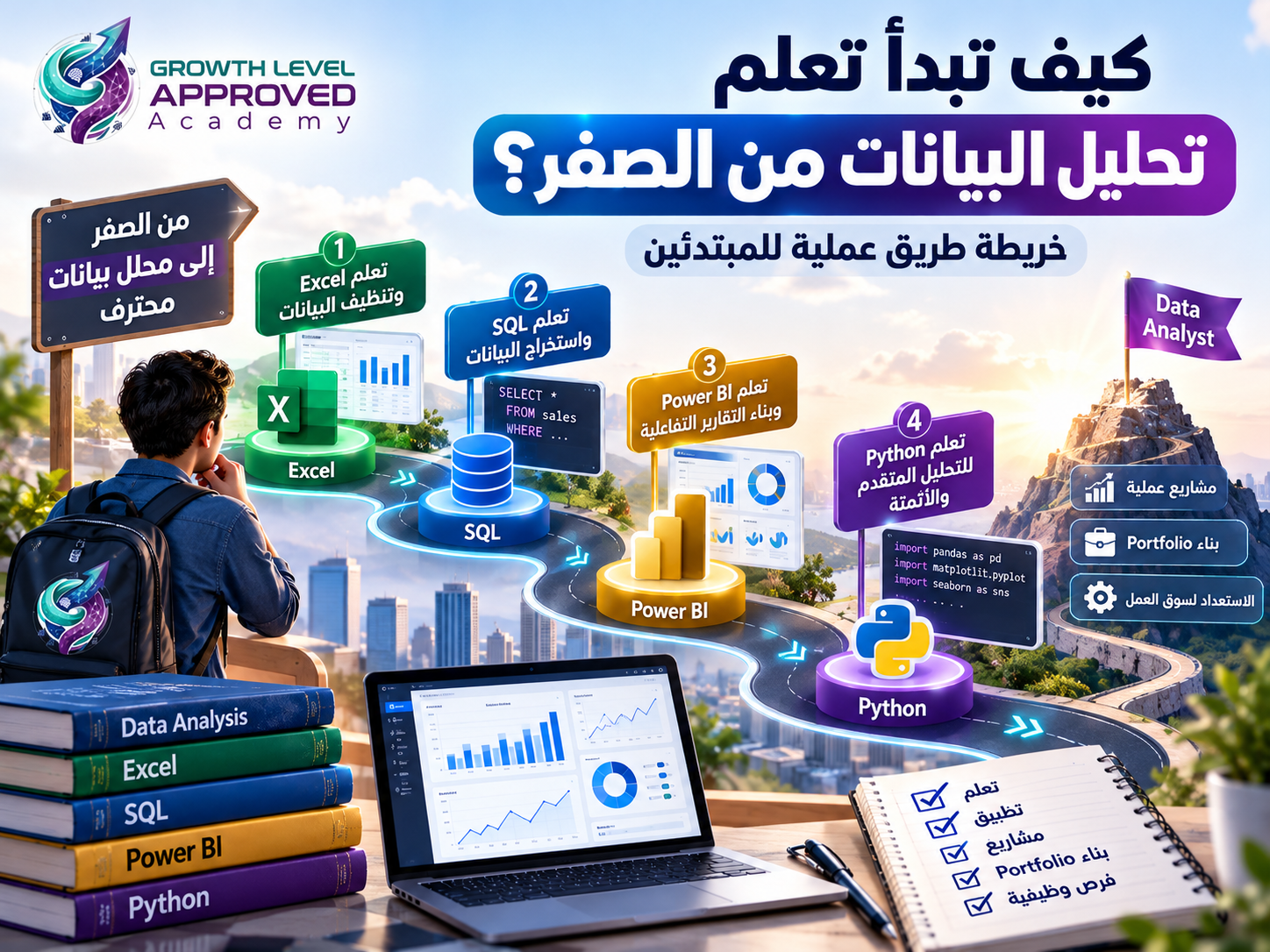
How to Learn These Skills in the Right Order
A beginner can follow five stages.
Stage 1: Learn data fundamentals, Excel, introductory statistics, and analytical thinking.
Stage 2: Study SQL and data cleaning.
Stage 3: Develop Power BI reporting, DAX, data modeling, and KPI knowledge.
Stage 4: Add Python for automation or advanced analytical requirements.
Stage 5: Improve storytelling, communication, and business understanding throughout every project.
The objective is to develop skills in context rather than studying each topic in isolation.
A Complete Portfolio Project to Test Your Skills
Imagine analyzing an online store with customer, product, order, and transaction data.
Complete these tasks:
Inspect and clean the dataset.
Join and aggregate tables using SQL.
Calculate sales and profitability KPIs.
Build a Power BI dashboard.
Use Python for an additional automated or analytical task when appropriate.
Write a report explaining three insights, two recommendations, and the analysis limitations.
A complete project like this provides evidence of multiple skills working together.
How to Prepare for a Data Analyst Interview
Be ready to explain:
A project you completed independently.
How you identified and fixed data quality issues.
Differences between SQL joins.
GROUP BY versus window functions.
How you validated reported revenue.
Why you selected a particular visualization.
How you interpreted a business metric.
What you did when results contradicted initial expectations.
Explaining your reasoning is often more informative than memorizing definitions.
How AI Is Changing Data Analyst Skills
AI tools can assist with SQL queries, DAX measures, Python scripts, dashboard explanations, and written summaries.
However, AI-generated answers can be inaccurate.
A tool may overlook duplicated transactions, misunderstand a metric, or produce code that runs but calculates the wrong result.
Therefore, validation, domain knowledge, critical thinking, and communication remain essential skills.
Frequently Asked Questions
What is the most important skill for a beginner data analyst?
Start with analytical thinking, basic statistics, and Excel. Then develop SQL and reporting skills according to your career goals.
Is Python required for every data analyst job?
No. Python is useful for automation and advanced analysis, but job requirements vary.
Can I become a data analyst with Excel alone?
Some analytical tasks rely heavily on Excel. However, SQL and visualization tools can broaden the problems and roles you are prepared to handle.
What soft skills do data analysts need?
Critical thinking, problem-solving, communication, collaboration, time management, and business awareness.
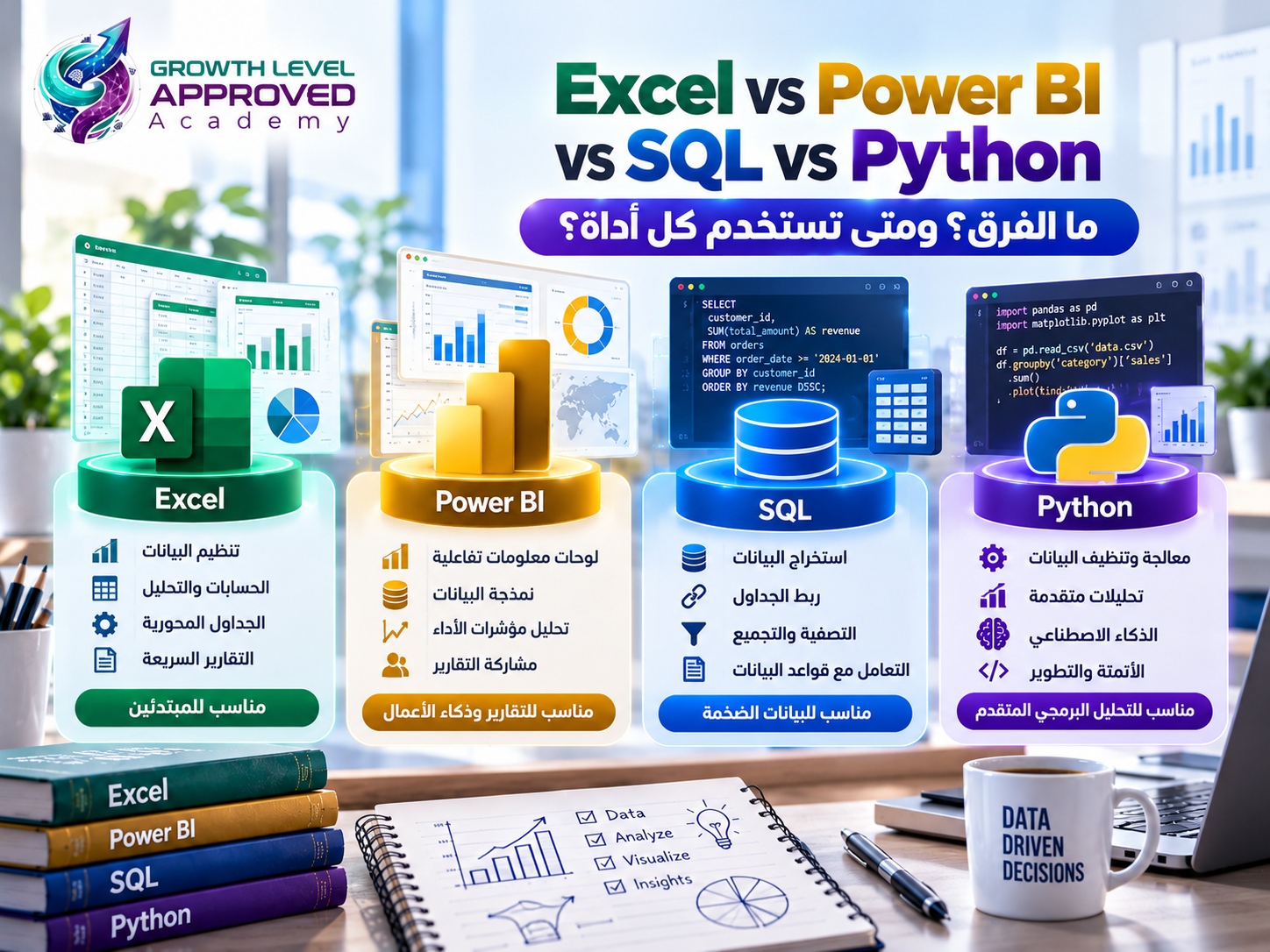
Is Power BI more important than SQL?
Neither tool is universally more important. SQL is valuable for relational data, while Power BI supports data modeling and reporting.
How can I demonstrate skills without work experience?
Build original projects, document your methods, share permitted code and reports, and explain your findings clearly.
Are certifications enough to get a data analyst job?
Certifications may support your applications but cannot guarantee employment. Practical competence, relevant experience, and communication also matter.
Conclusion
Successful data analysts combine technical knowledge with reasoning, business understanding, and communication.
Excel, SQL, statistics, Power BI, and Python are valuable tools, but the ability to formulate questions, validate results, and explain insights is equally important.
At Growth Level Approved Academy, our training approach emphasizes live learning, practical applications, and project-based skill development.
Explore our Excel and Power BI data analysis training program to determine whether its curriculum matches your learning needs and goals.
References
Microsoft Learn — Data Analyst Career Path:
https://learn.microsoft.com/en-us/training/career-paths/data-analystMicrosoft Learn — Power BI Data Analyst Study Guide:
https://learn.microsoft.com/en-us/certifications/resources/study-guides/PL-300Microsoft Power Query:
https://learn.microsoft.com/en-us/power-query/PostgreSQL SQL Language:
https://www.postgresql.org/docs/current/sql.htmlPython Documentation:
https://docs.python.org/3/pandas Documentation:
https://pandas.pydata.org/docs/Microsoft Excel:
https://support.microsoft.com/excel
Comments (0)
No comments yet. Be the first!