Excel vs Power BI vs SQL vs Python: Which Tool Should You Use?
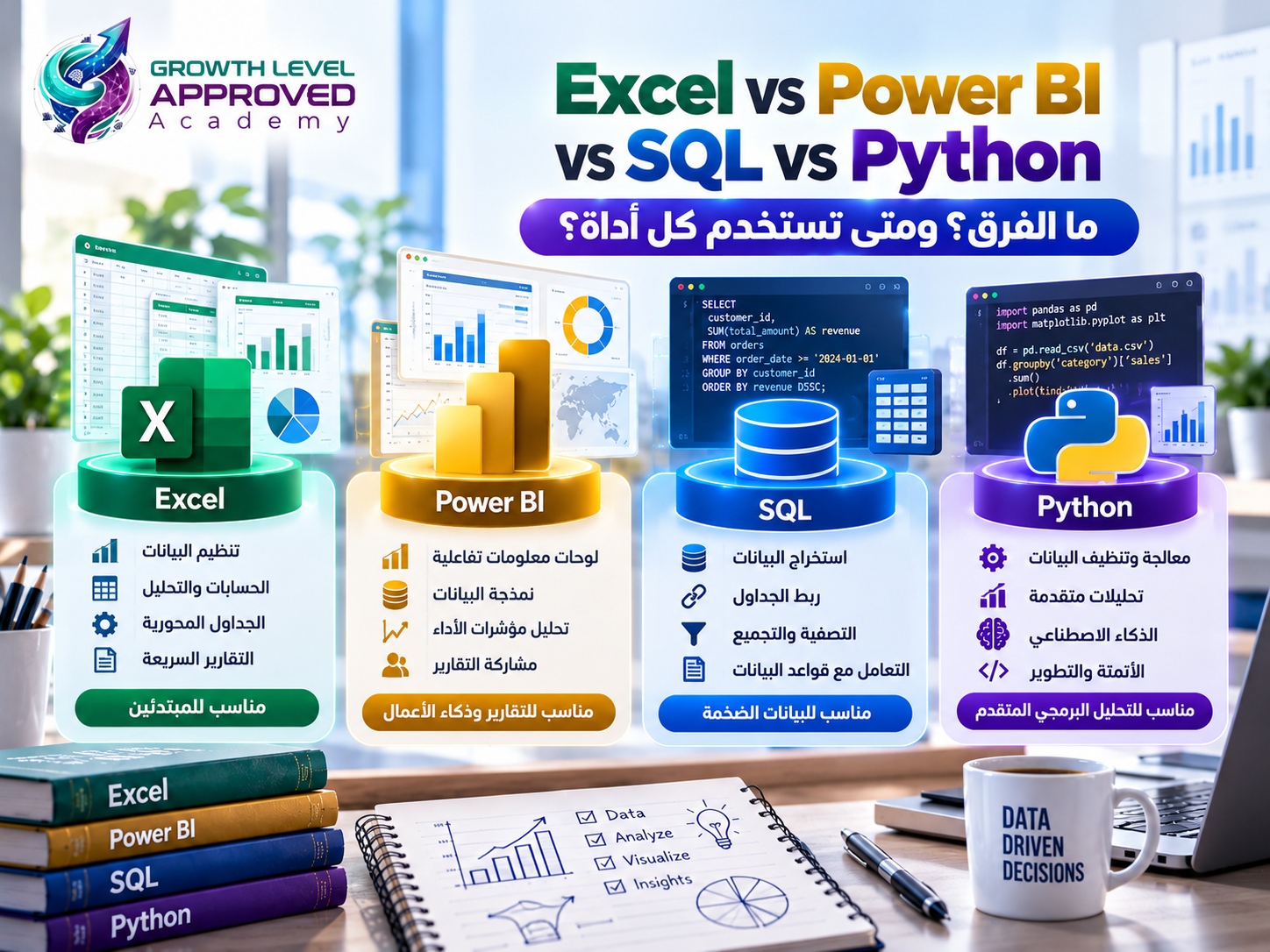
Excel vs Power BI vs SQL vs Python: Which Tool Should You Use for Data Analysis?
If you're learning data analysis, you've probably wondered which tool deserves your attention first: Excel, Power BI, SQL, or Python.
Some beginners assume these technologies compete with one another. In practice, each plays a different role, and they frequently work together.
Excel is primarily a spreadsheet application, Power BI is a business intelligence platform, SQL is a database query language, and Python is a general-purpose programming language.
Understanding these differences helps you choose the right tools for your projects, develop an effective learning roadmap, and avoid spending time on technologies you don't yet need.
Excel vs Power BI vs SQL vs Python: Quick Comparison
Tool | Primary Purpose | Common Use |
|---|---|---|
Excel | Spreadsheets and calculations | Data preparation and exploratory reporting |
Power BI | Business intelligence | Interactive dashboards and business metrics |
SQL | Relational database queries | Retrieving and aggregating stored data |
Python | General-purpose programming | Automation, analysis, and machine learning |
These are typical strengths, not absolute limitations. The tools have overlapping capabilities.
1. What Is Microsoft Excel?
Microsoft Excel is a spreadsheet application used to organize data, perform calculations, and develop analytical reports.
Key Data Analysis Features
Excel provides:
Formulas and functions.
Tables, sorting, and filtering.
PivotTables and PivotCharts.
Conditional Formatting.
Power Query.
Data modeling features in supported editions.
Example Use Case
A sales manager provides a spreadsheet containing 3,000 transactions and asks for total revenue by region.
Using a PivotTable, you can summarize the data without building a custom program.
Advantages
Excel is accessible to many beginners and supports quick calculations, manual review, financial modeling, and spreadsheet reporting.
Limitations
Large, complex workflows involving numerous manually maintained spreadsheets can become difficult to control.
Data quality, collaboration, version management, and repeated updates may require additional processes or centralized systems.
When Should You Use Excel?
Choose Excel when you need quick spreadsheet analysis, manual data inspection, financial calculations, or introductory analytical projects.
2. What Is Microsoft Power BI?
Power BI is Microsoft's business intelligence platform for connecting data, creating data models, calculating metrics, and developing interactive reports.
Key Features
Data connections and Power Query.
Relationships between data tables.
DAX measures.
Interactive charts and filters.
KPI dashboards.
Report publishing and sharing, subject to licensing requirements.
Example Use Case
A retailer wants to monitor sales performance across five branches.
A Power BI report can display revenue, order counts, gross profit, product performance, and monthly trends.
Users can filter the report by branch, product category, or date.
Advantages
Power BI combines data modeling, analytical calculations, and interactive visualization.
It is particularly useful when business users need consistent metrics and reports that can be refreshed.
Limitations
Reliable reporting requires good data modeling and an understanding of relationships and filter context.
Some sharing, collaboration, and cloud capabilities require paid licensing.
When Should You Use Power BI?
Choose Power BI when you need recurring interactive reports, business dashboards, and analytical models based on one or more data sources.
3. What Is SQL?
SQL stands for Structured Query Language.
It is used to query and work with relational databases.
SQL is a language rather than a single database product. Systems such as PostgreSQL, MySQL, and Microsoft SQL Server implement SQL with some differences.
Why Is SQL Important?
Company data is often distributed across related database tables.
For example, customer information, product details, orders, and payments might be stored separately.
SQL allows analysts with appropriate permissions to retrieve, filter, join, and aggregate this information.
Practical SQL Example
Suppose a sales table contains region, quantity, and unit_price.
SELECT
    region,
    SUM(quantity * unit_price) AS total_revenue
FROM sales
GROUP BY region
ORDER BY total_revenue DESC;
The query calculates revenue by region and sorts the results in descending order.
It assumes that quantities and prices are valid and that returns and discounts do not require additional adjustments.
Advantages
SQL supports efficient database queries, joins, aggregations, and analytical functions.
It also reduces the need to export entire database tables into spreadsheets.
Limitations
SQL is not primarily designed for interactive dashboard creation. Specialized statistical analysis and machine learning may require additional technologies.
SQL syntax and supported features also vary between database systems.
When Should You Use SQL?
Choose SQL when the data is stored in a relational database or when a project requires combining, filtering, and aggregating related tables.
4. What Is Python?
Python is a general-purpose programming language widely used for data analysis, automation, software development, artificial intelligence, and scientific computing.
Important Python Libraries
pandas: Data cleaning, transformation, and analysis.
NumPy: Numerical computation.
Matplotlib: Data visualization.
Seaborn: Statistical graphics.
scikit-learn: Machine learning.
Practical Python Example
Assume sales.csv contains Region, Quantity, and UnitPrice.
import pandas as pd

df = pd.read_csv("sales.csv")

df["Revenue"] = df["Quantity"] * df["UnitPrice"]

result = (
    df.groupby("Region")["Revenue"]
      .sum()
      .sort_values(ascending=False)
)

print(result)
The program calculates revenue for each record and then summarizes revenue by region.
Advantages
Python supports automation, reusable analytical pipelines, statistical techniques, customized workflows, and machine learning.
It integrates with files, databases, and APIs.
Limitations
Python requires programming knowledge, debugging skills, and familiarity with libraries and development environments.
For simple manual spreadsheet tasks, Excel may be more convenient. For business-facing dashboards, a dedicated BI platform may require less custom development.
When Should You Use Python?
Choose Python when you need automation, customized analysis, statistical programming, or advanced data processing.
Can These Tools Work Together?
Absolutely. Consider an e-commerce company with 50,000 orders, 2,000 products, and 12 months of customer transactions.
Management wants to investigate declining gross profit.
A possible workflow is:
Step 1 — SQL: Extract and combine customer, order, and product data from the database.
Step 2 — Excel: Review a sample, verify calculations, and communicate preliminary findings.
Step 3 — Python: Automate repetitive cleaning, quality checks, or additional analytical tasks.
Step 4 — Power BI: Build an interactive dashboard with revenue, gross profit, profit margins, product categories, and regional comparisons.
Step 5 — Business interpretation: Investigate the reasons behind declining margins and explain which findings require further validation.
This is why learning complementary tools can be more valuable than looking for one tool that replaces everything else.
Excel vs Power BI: Which Is Better?
Excel is particularly useful for direct spreadsheet work, calculations, financial models, and exploratory analysis.
Power BI emphasizes reusable data models, interactive reports, and business intelligence workflows.
However, Excel can perform sophisticated data modeling and reporting, while Power BI also supports transformation and analytical calculations.
Neither tool is universally superior.
SQL vs Python: Which Is Better?
SQL specializes in relational data queries.
Python supports a broader range of programming and analytical operations.
If your primary task is aggregating millions of database records, performing the aggregation in the database with SQL may be an effective approach.
If your task involves customized statistical analysis, automation, or machine learning, Python may be more suitable.
Many professional workflows use both.
Which Data Analysis Tool Should Beginners Learn First?
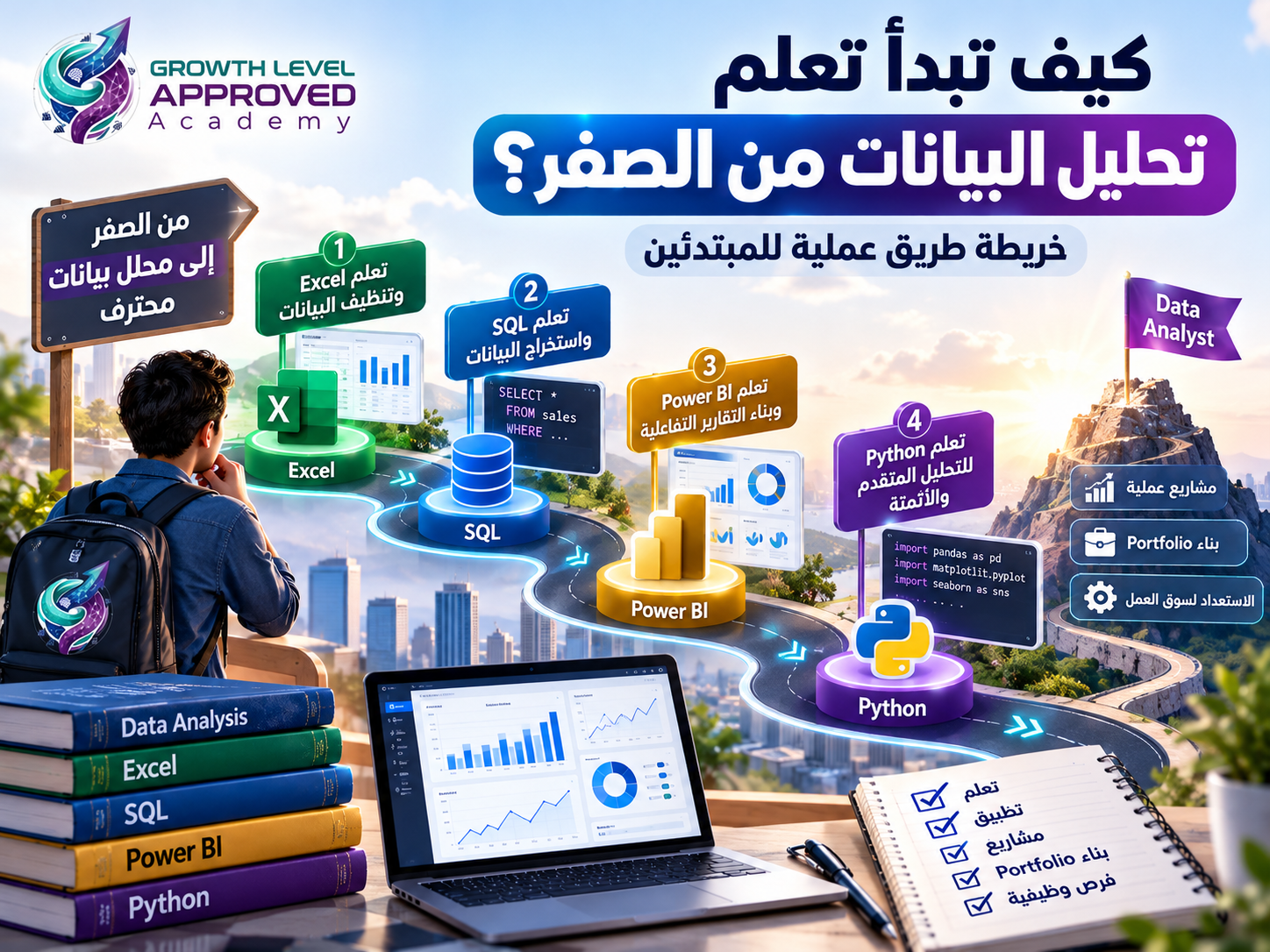
For many aspiring business data analysts, a sensible sequence is:
Excel → SQL → Power BI → Python
Start with Excel to understand data tables, functions, and basic analysis.
Learn SQL to retrieve and organize relational data.
Use Power BI to develop data models, measures, and interactive reports.
Add Python for programming-based analysis and automation.
This is not the only valid sequence. Learners aiming for statistical programming or data science may benefit from learning Python earlier.
Do You Need All Four Tools to Get a Data Analyst Job?
Not necessarily.
Different employers require different combinations of skills.
Some positions emphasize Excel and SQL. Others rely heavily on Power BI and DAX. More technical analytical roles may require Python and advanced statistics.
Study relevant job descriptions in your target market and identify the recurring requirements.
Employers generally need evidence that you can solve analytical problems, not merely a list of software names.
Are Excel, Power BI, SQL, and Python Free?
Their pricing models differ.
Excel: Generally requires an appropriate Microsoft license, although versions and available features vary.
Power BI: Power BI Desktop is available at no cost, while certain online sharing and collaboration features require paid licensing.
SQL: The language itself is not a paid subscription. Free database systems such as PostgreSQL are available, while hosting and commercial database services may have costs.
Python: Python is free and open source, and many widely used analytical libraries are also free.
Common Mistakes When Choosing Analytical Tools
Choosing the Tool Before Understanding the Problem
Start by defining the question, identifying available data, and determining the required output.
Assuming Python Replaces Everything
Python is versatile, but databases, spreadsheets, and dedicated BI tools still provide valuable capabilities.
Ignoring Data Modeling in Power BI
Incorrect relationships and measures can create misleading totals or duplicate calculations.
Using Spreadsheets for Every Workflow
Repeated manual file manipulation can become difficult to manage at organizational scale.
Neglecting Analytical Reasoning
Software proficiency does not replace statistics, critical thinking, data quality checks, and business communication.
Frequently Asked Questions
What is the main difference between Excel and Power BI?
Excel is a spreadsheet application used for calculations and analysis. Power BI focuses on analytical models, interactive reporting, and business intelligence.
Should I learn SQL before Power BI?
SQL is a useful foundation when you expect to analyze database information. However, you can also begin with Power BI using spreadsheet data.
Can Python replace SQL?
Python can connect to databases and execute SQL queries, but SQL remains an important skill for working with relational data.
Is Excel easier than Python?
Excel is generally more approachable for beginner spreadsheet analysis. Python requires programming knowledge but offers greater flexibility for custom workflows.
Can Power BI connect to SQL databases?
Yes. Power BI supports connectors to various database systems, subject to available connectors, permissions, and connectivity requirements.
Can I work as a data analyst using only Excel and Power BI?
Some roles depend heavily on those tools, but specific requirements vary by employer. SQL and additional analytical skills may broaden your opportunities.
Which tool is best for data analysis?
The best tool depends on the data source, analytical task, required outputs, team environment, and budget.
Conclusion
Excel, Power BI, SQL, and Python offer different but complementary capabilities.
Excel is useful for spreadsheets and calculations. Power BI provides interactive reporting and data modeling. SQL retrieves and aggregates relational data. Python supports programmable analysis, automation, and advanced techniques.
Rather than trying to master all four immediately, identify your learning goals and build your skills through practical projects.
At Growth Level Approved Academy, our training approach emphasizes practical applications and project-based learning.
Explore our Excel and Power BI data analysis training program to learn more about its curriculum and determine whether it aligns with your goals.
References
Microsoft Excel PivotTables: https://support.microsoft.com/en-us/excel/get-started/create-a-pivottable-to-analyze-worksheet-data
Microsoft Power BI: https://learn.microsoft.com/en-us/power-bi/
Microsoft Power Query: https://learn.microsoft.com/en-us/power-query/
DAX Overview: https://learn.microsoft.com/en-us/dax/dax-overview
PostgreSQL SQL: https://www.postgresql.org/docs/current/sql.html
Python Documentation: https://docs.python.org/3/
pandas Documentation: https://pandas.pydata.org/docs/
Comments (0)
No comments yet. Be the first!